
Many business owners have asked us some version of the same question this year: “Is Google using my website to train its AI, and can I stop it without disappearing from Google?” On 24 November 2026 Google gave a much clearer answer. It added a standalone page on the Google-Extended token to its crawling documentation and updated its guide Control how your content is used for generative AI at Google.
Search Engine Land reported that the new documents came out alongside Google’s new Search ranking hub, and that Google said there is no change in how it honours Google-Extended: it does not remove sites from Search results and is not a ranking signal. Below, every rule is taken from Google’s own pages, followed by what we think it means for a local business.
What Google-Extended is, in plain words
Google-Extended is a product token you use in robots.txt, not a separate crawler. Google says it does not run a “Google-Extended web crawler”. Instead, when Googlebot, GoogleOther or other training- and grounding-related crawlers fetch a page, they record whether that page has disallowed Google-Extended, and Google’s systems apply that choice later.
If you disallow it, Google says it limits two things for “commercially available Google generative AI products and services” outside Search:
- Training: using your content to train future generations of Google’s foundation models;
- Grounding: giving your content from the Search index to those AI products at prompt time to make answers more factual, in products “aside from Search and other Search services”, such as the Gemini app.
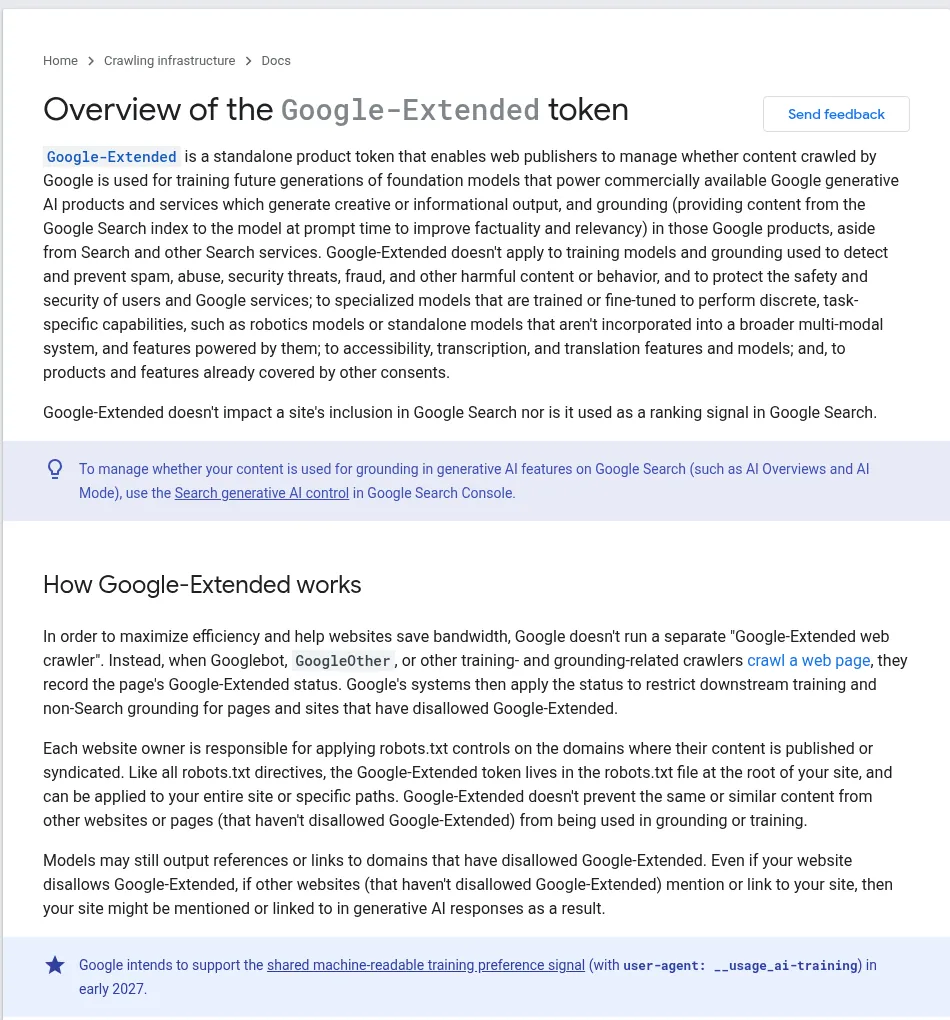
Google also lists what Google-Extended does not cover: models used to fight spam, fraud and abuse or to protect users, specialised task-specific models, accessibility, transcription and translation features, and products already covered by other consents.
Training vs grounding: why the difference matters
Google’s updated guide separates the two uses of crawled content clearly:
- AI model training teaches future foundation models (such as Gemini models) language, reasoning and general knowledge before a model is deployed.
- Grounding looks up fresh information from the Google Search index when someone asks a question, to improve accuracy and link to supporting pages. Google says it happens after training and is completely independent of it, and that allowing grounding “enables these experiences to show links to your site”.
For a business, grounding is the part that can send visitors. It is how AI Overviews, AI Mode and the Gemini app find pages to cite and link. Training has no direct link back to your site.
Google-Extended vs the Search generative AI control
Google-Extended does not control AI Overviews or AI Mode. For those, Google points to a separate setting: the Search generative AI control in Search Console (Settings > Search generative AI), which Search Console Help says was rolled out to all websites worldwide as of 31 August 2026. Choosing “Exclude” keeps your links and content out of AI Overviews, AI Mode and generative AI features in Discover. Google says it generally takes effect within a few days, does not affect AI training, and is not used as a ranking signal for the rest of Search.
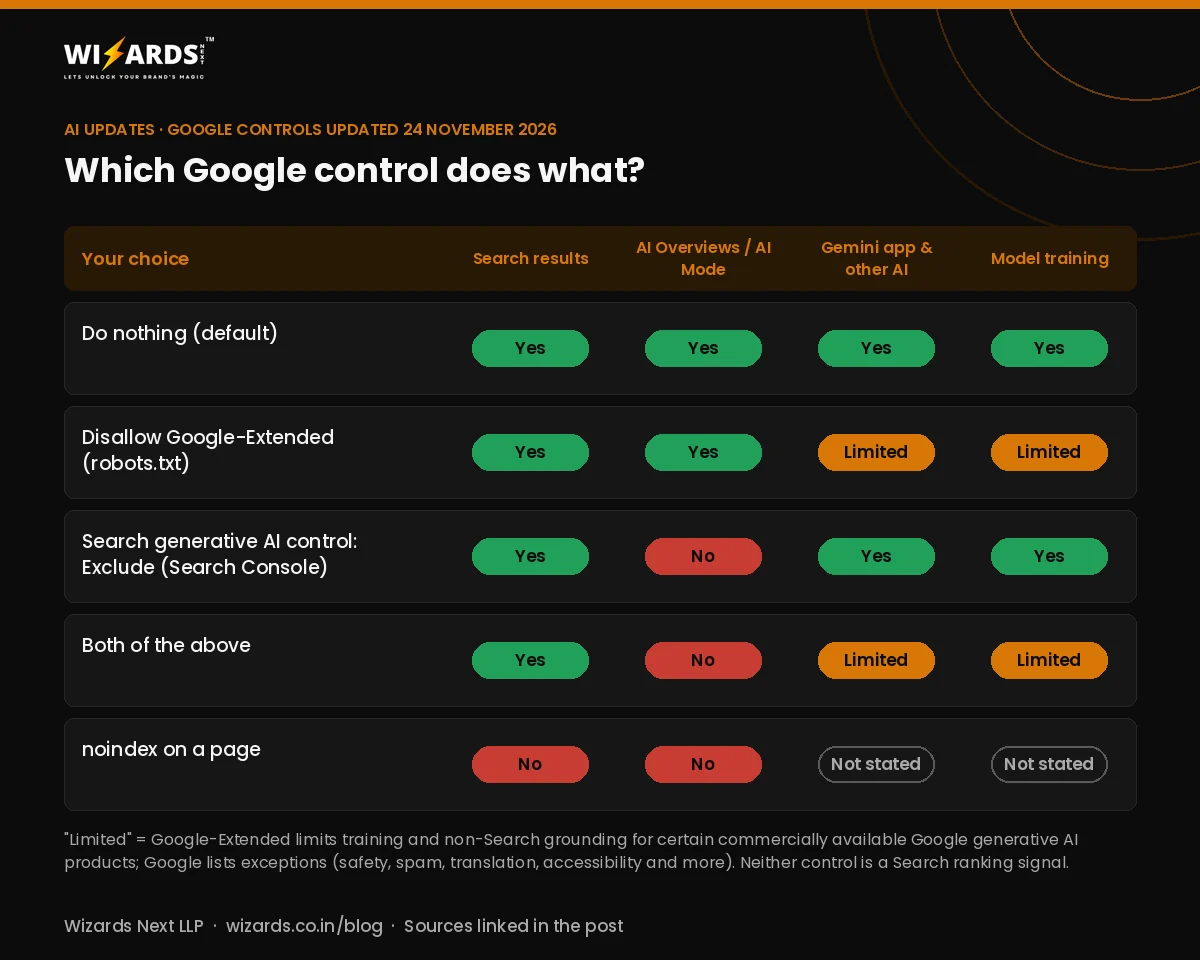
Google’s guide includes a “Which control should I use?” table that combines the two. The key rows are below.
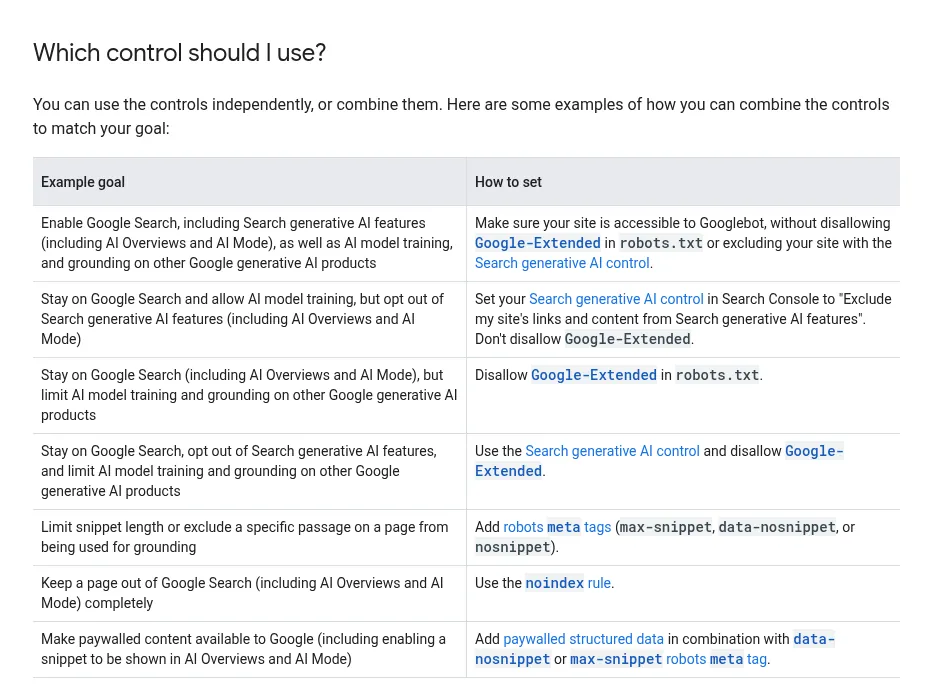
- Stay everywhere (the default): let Googlebot crawl your site, don’t disallow Google-Extended and don’t exclude your site in Search Console.
- Stay on Search, AI Overviews and AI Mode, but limit training and non-Search grounding: add “User-agent: Google-Extended” and “Disallow: /” to robots.txt.
- Stay on Search but opt out of AI Overviews and AI Mode: use the Search generative AI control in Search Console. This does not stop training.
- Control single pages or passages: use nosnippet, max-snippet or data-nosnippet; use noindex to keep a page out of Google Search completely, including AI features.
Google also says it plans to support a shared AI training signal in robots.txt (“user-agent: __usage_ai-training”) in early 2027, based on IETF work, which it announced on 30 October 2026.
Our advice for a local business
For most clinics, shops, restaurants and service businesses, the content on the website is there to be found: services, prices, timings, location and FAQs. In that case we recommend the default and not blocking anything, because grounding is how AI answers link to you. Our own site does not block Google-Extended either.
- Before you block anything, ask what you are protecting. Original research, paid courses or detailed guides may be worth limiting; a service page usually is not.
- Opting out of AI Overviews and AI Mode removes the links too. Search Console Help says you will not receive traffic or impressions from those features, and content from other sites may still appear.
- Blocking does not stop mentions. Google says models can still mention or link your site if other websites talk about you, and content copied on other sites can still be used.
- Check your robots.txt after a website rebuild. Plugins and templates sometimes add AI blocks you did not choose. Test it with Search Console’s robots.txt report.
- Measure first. The Search Console generative AI performance report shows how your content performs in these features, so you can see what you would lose.
These controls only matter if Google can find good pages to cite. One clear page per service and per city, such as our digital marketing agency in Varanasi page, gives AI Mode and AI Overviews specific pages to link. Read more in our post on Gemini 4 Hydrogen in Google AI Mode.
Where Wizards can help
Our SEO consultancy and local SEO services in Varanasi cover robots.txt, indexing and Search Console checks, and our AI consultancy helps teams decide how to use AI tools and what to share with them. If you are unsure whether your website is blocking or allowing the right things, book a call and we will check it with you. You may also like our posts on the November 2026 core update and Search Console branded queries.
Frequently asked questions
What is Google-Extended?
Google-Extended is a product token used in robots.txt. Disallowing it limits whether Google uses your content to train future foundation models and to ground answers in certain commercially available Google generative AI products outside Search, such as the Gemini app. It is not a separate crawler.
Will blocking Google-Extended hurt my Google rankings?
Google says Google-Extended does not affect a site’s inclusion in Google Search and is not used as a ranking signal. Google told Search Engine Land on 24 November 2026 that there is no change in how it honours the token.
Does Google-Extended remove my site from AI Overviews and AI Mode?
No. Google says that to manage grounding in AI Overviews and AI Mode you use the Search generative AI control in Search Console. That control does not affect AI training, so the two are set separately.
Should a small business block AI training?
It depends on what your content is. Most local business pages exist to be found, so we usually recommend the default. Businesses that publish original research or paid content may choose to disallow Google-Extended. Opting out of AI Overviews and AI Mode also removes your links from those features.
Sources
- Google Crawling Infrastructure: Overview of the Google-Extended token (last updated 24 Nov 2026)
- Google Crawling Infrastructure: Documentation changelog (24 Nov 2026)
- Google Search Central: Control how your content is used for generative AI at Google (last updated 24 Nov 2026)
- Search Console Help: Search generative AI control
- Google Search Central Blog: Supporting a shared AI training control for websites (30 Oct 2026)
- Search Engine Land: Google releases new search ranking transparency hub (24 Nov 2026)
Written by Ravi Khetan, Founder, Wizards Next LLP, a digital marketing agency in Varanasi. About us